

Microsoft isn’t secretive when it comes to working on a number of apps for Android and in fact, they’ve released an office app for the Android operating system, there’s also a keyboard app especially designed for excel users and a smart lock screen app to name a few. Now Microsoft has it again as they release a new launcher for Android called the Arrow Launcher Beta and as the name suggest, the app is at its early stage of production where certain issues and bugs are common. Added to that, the app can only be download through an invitation in which if anyone would want to test out Redmond’s take on an Android launcher will have to secure an invite by signing up on the test program.
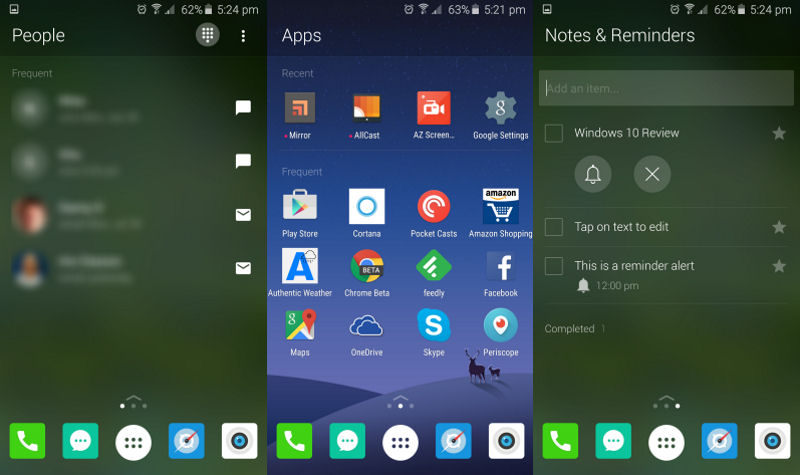
The Arrow Launcher Beta is divided into three special pages; the People, Apps and the Notes & Reminders. These default pages comes as default and cannot be removed or add pages and are simply straight forward on their functionality. The Peoples page shows all your contacts from their phone numbers and email addresses, next is the apps pages and as the name suggest, lists all the apps installed on your system. The apps page is split into two categories with Recent and Frequent tabs. The Recent tab shows all your newly installed apps while the Frequent tab shows all the apps that you usually use. The Notes & Reminders tab offers users a way to organize alarms and add reminders and personal notes.

The app dock on the Arrow Launcher Beta comes with an arrow and swiping the screen from bottom up reveals a list of frequently used apps as well as links to the launcher Settings, Wallpaper and Feedback form. As our source points out, and since as it seems the app is currently in beta, customization isn’t much for the app launcher but wallpapers can be easily change for the time being.
The app looks polished even at a very early life but we could also expect added features for future development as the app do have a lot of room for improvements. For those who wants to test out the new app can do so by joining the development team’s Google+ community and ask for an invitation. For users who doesn’t want to take the invitation route can also download the apk file from here.
Related articles
 Microsoft working on Arrow Launcher beta for Android devices(trustedreviews.com)
 Microsoft working on New Arrow Launcher for Android(theappzine.com)
 Microsoft beta launches their own Android launcher(androidcommunity.com)
 This is Microsoft’s Arrow Launcher for Android (download APK)(wmpoweruser.com)
 Microsoft Debuts Android Launcher(phonescoop.com)
 Microsoft’s working on an Android launcher of its own(engadget.com)


Discover more from onetechavenue
Subscribe to get the latest posts sent to your email.