
 Apple
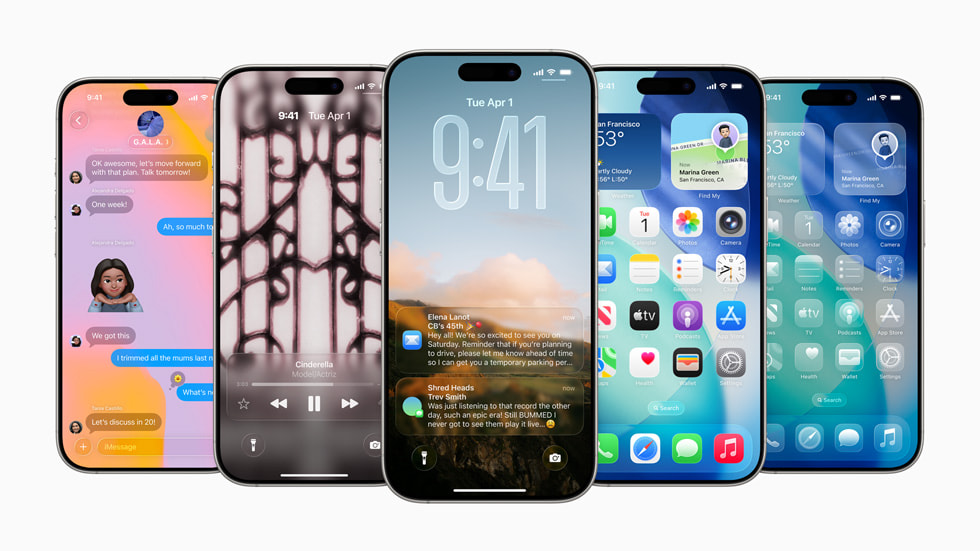
iOS has come a long way—from its almost toy-like beginnings, through the Aqua era, to the sleek, modern aesthetics we see today. Over the years, it has become the blueprint for UI design across nearly all modern smartphones. Now, with Apple’s biggest overhaul since iOS 7, the company is leaping from iOS 18 to iOS 26, aiming to unify the user experience across its entire ecosystem with the introduction of a new design language called Liquid Glass.
Inspired by visionOS, Apple describes Liquid Glass as a way to “make something purely digital feel natural and alive.” The new interface brings a glassy, semi-transparent look combined with dynamic, responsive elements—creating a more immersive experience across devices.
Redesigned Lock Screen and Widgets
The Lock Screen has been modernized with the new Liquid Glass aesthetic, making it more responsive and visually engaging. Wallpapers now appear more three-dimensional, featuring enhanced spatial effects. The time widget, already a standout in previous versions, now smartly adapts to photo subjects and notification counts for a more cohesive experience.
More Customization with Apple Intelligence
With iOS 26, personalization takes center stage. Thanks to Apple Intelligence, users gain greater control over app icons, widgets, and home screen aesthetics. The Liquid Glass effect gives everything a semi-transparent, futuristic appearance while keeping functionality intuitive and accessible.

Revamped Built-In Apps
iOS 26 brings thoughtful changes to the core apps:
- Camera App: A swipe gesture reveals all settings in one place, with quick access to photo and video quality options.
- Photos App: Introduces a refreshed UI with new Library and Collections tabs. Impressively, you can now turn any 2D photo into a 3D Spatial Scene.
- Safari: Gains a dynamic tab bar that adapts as you scroll, shrinking to reveal more content. It also comes with improved security, including enhanced fingerprinting protection enabled by default.
- FaceTime: Features a redesigned landing page with personalized contact posters and support for video messages.
- Apple Music, News, and Podcasts: All adopt a floating tab bar that minimizes during browsing to prioritize content and expands when scrolling back up.
Smarter Phone Experience
The Phone app now includes a unified view of Favorites, Recents, and Voicemails. With AI-powered voicemail summaries, you can quickly understand messages without listening to them. A new Hold Assist feature notifies you when a live agent joins the call, saving you time.


Privacy gets a boost too, with Call Screening—calls from unknown numbers will only ring if the caller provides their name and reason.
Messaging & CarPlay Enhancements
The Messages app adds message screening for unknown senders, new custom chat backgrounds, and even the ability to create polls.
CarPlay has been rebuilt from the ground up. The new design introduces:
- Compact call views that don’t obstruct the entire interface
- Tapback reactions and pinned conversations in Messages
- CarPlay Ultra, a deeper integration with your vehicle’s infotainment system, offering an even smoother driving experience

These are just a few of the standout features in iOS 26. As you install and begin using the OS, you’ll uncover many more enhancements throughout the system.

If you’re a member of the Apple Developer Program, you can try these features today. For members of the Apple Beta Software Program, access will begin next month.
Note: Apple Intelligence features are only supported on the following devices:
- All iPhone 16 models
- iPhone 15 Pro
- iPhone 15 Pro Max
Discover more from onetechavenue
Subscribe to get the latest posts sent to your email.