
Google is now testing chat bubbles for its Messages app

Many people nowadays are accustomed to the message bubble from Facebook Messenger and having it around on most devices proves to become convenient for users. So that makes us wonder, Why Google haven’t really adopted this feature on their own apps? knowing that Android itself is developed by Google and that they have all the resources to do so.
With Android 10 however, this could come with their native Messages app and eventually across Android apps. In fact, Google is now testing the new notification system that could completely replace Android’s existing overlay API.
According to a post from XDA Developer website, the new Bubble notification system were first introduced back in April with the Android Q Beta 2 but did not make into the stable version of Android 10.
Fortunately for developers and for those who are a little adventurous may enable the feature manually though Android 10’s developer options but going through (Settings > Developer Options > Bubbles). Google is even encouraging software developers to test the new API on their apps to have them ready when the feature is publicly enable for all users.
To demonstrate the capabilities of the new Bubble notification system, Google is preparing its own Messages app to support the feature.
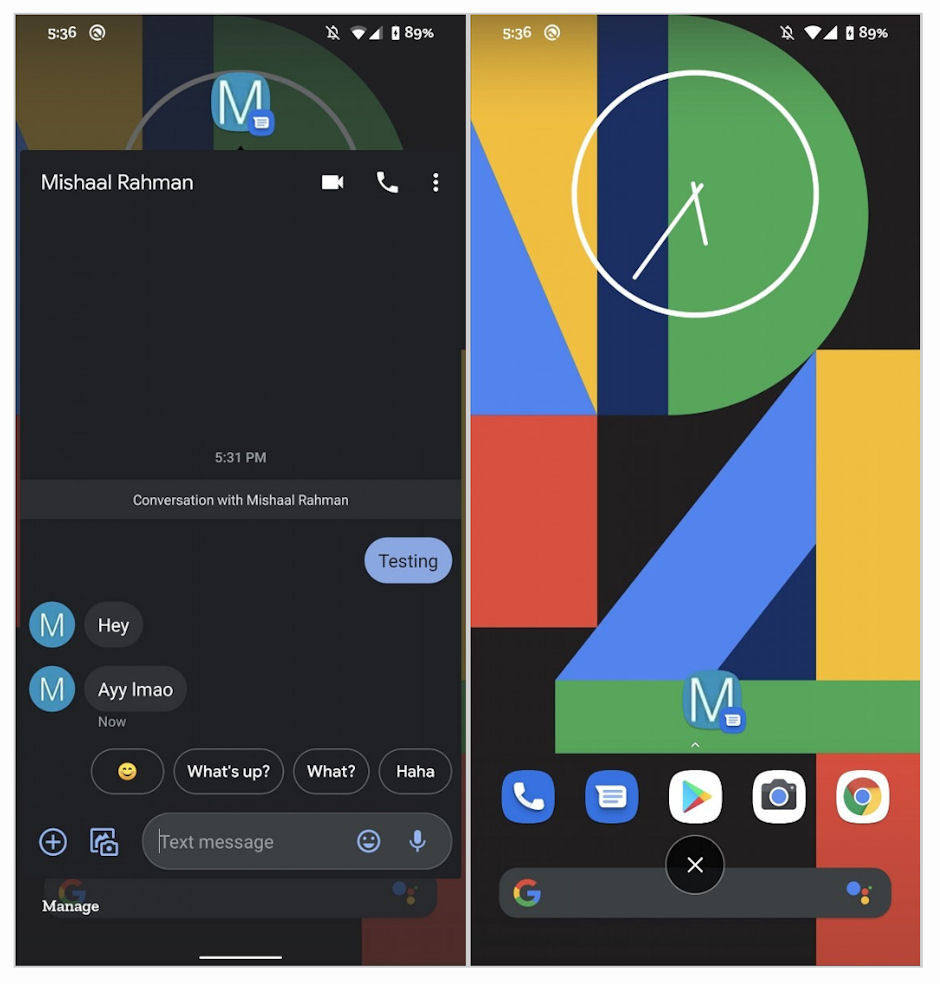

Right now, the feature is a hit or miss for users but one XDA Developer user had successfully enabled the feature for him and took a few screenshots with the Message Bubble in action.
As seen from these screenshots, the new Messages bubble works similar to the Facebook Messenger App bubble. It shows a bubble with the Picture of the Contact on it together with a preview of the received message and a notification dot which reminds the user that a new unread message was recently received.
Tapping on the bubble would bring the message into quick view and allow the user to do actions on the message just like we do on the Messages app. Dismissing the bubble is also easy, just like those chat bubble on Facebook Messenger, Messages bubble can also be dismissed by dragging the chat bubble toward the “x” icon down at the bottom.
There’s no word as to when the Google will fully implement the feature but knowing that it’s still under development, expect bugs to come every now and again.
Discover more from onetechavenue
Subscribe to get the latest posts sent to your email.