
Google Chrome 74 for desktop has a secret dark mode and here’s how to enable it

Google Chrome is most likely the browser you’re using right now and Google just rolled out Chrome 74.0 desktop browser for the Mac, PC and Linux platforms.

Along Chrome 74, Windows 10 users can enable dark mode (sort of). This brings a darker browser UI, browser menus and its Downloads window interface.
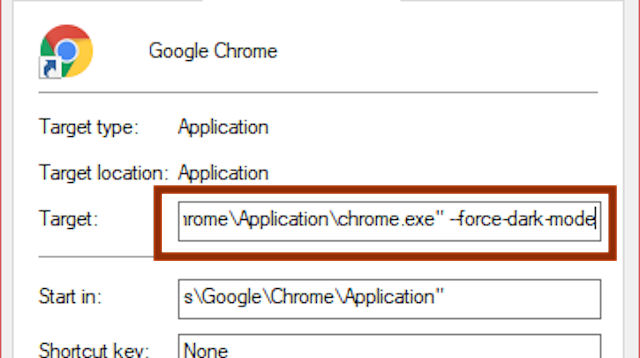
It’s not that you could enable it straight from the settings though, however with a little tweak. you could bring that feature enabled by modifying the shortcut file. To do that, here’s the steps:
- Right-click on your Chrome shortcut and select Properties
- Add “–force-dark-mode” to the end of the target location (without quotes)
- Launch Chrome and you should see the browser in full Dark-Mode
Along with other changes, Chrome 74 also can disable animation features to reduce motion sickness and there’s a new flag that prevents website from detecting Incognito mode.
Discover more from onetechavenue
Subscribe to get the latest posts sent to your email.