
Facebook finally lets you customized the Shortcut Bar and silence notification dots

If you are reading this, then most certainly you have a Facebook account. You could be using Facebook on the browser or with their mobile app, Facebook gives us the red notification button as a simple notification for things we might have missed. While they’re convenient, they do have negative impact as well, so Facebook did something to make it even more personalized for users to control what they want and don’t want to see on the social media app.
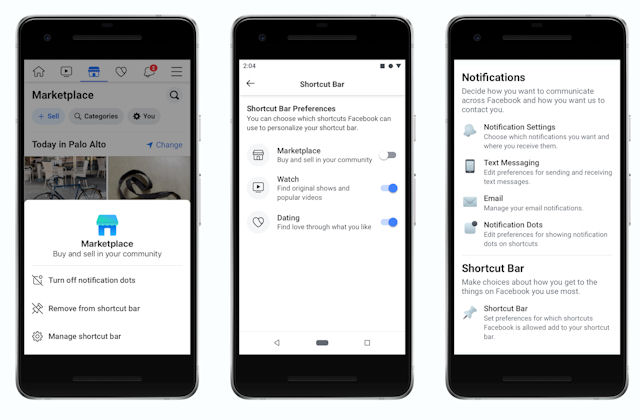
Facebook is rolling out a dedicated Shortcut Bar Settings on iOS now and on Android in the coming weeks. The new Shortcut Bar Settings should pop out by touching and holding one of the buttons from the Shortcut Bar, this action will allow users to turn on or off notifications, remove the shortcut entirely or customize the shortcut bar.

The new feature is a minor update to the Facebook App UI but the new navigation bar controls makes it easier for people to connect with the things they like and control the notifications they get within the Facebook app. This should give users more relevant features while getting less notifications.
Discover more from onetechavenue
Subscribe to get the latest posts sent to your email.