
Apple unveiled the new macOS Tahoe 26: A New Era for the Mac Begins
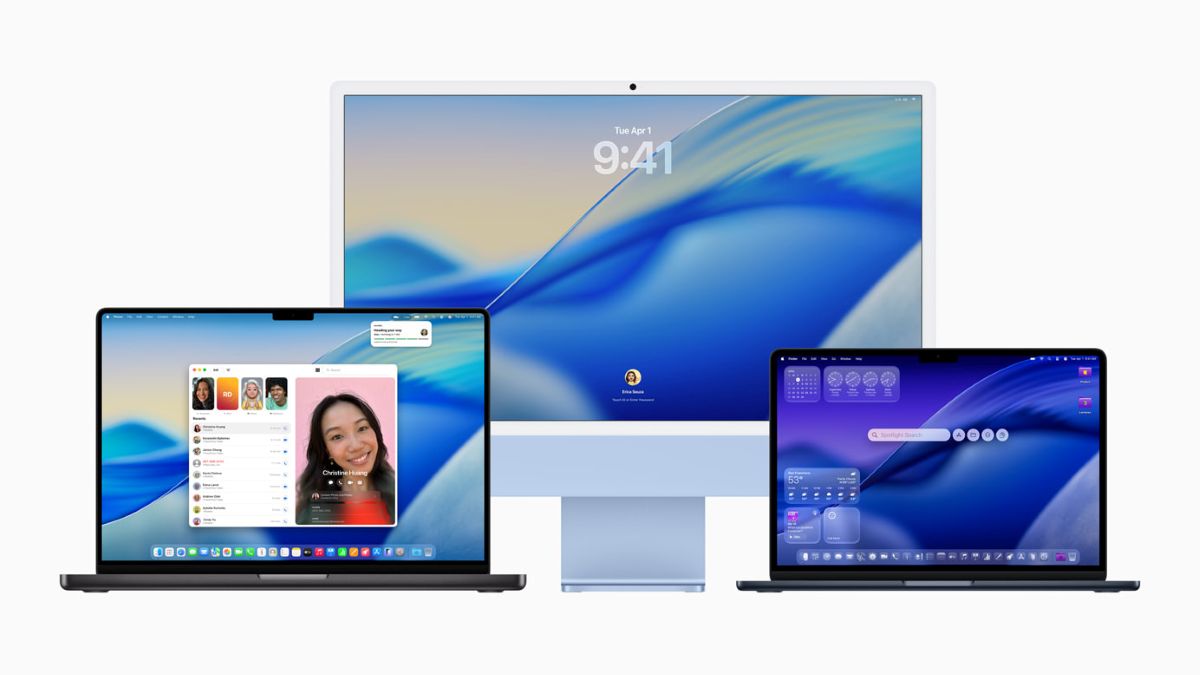 Apple MacOS Tahoe 26
Apple has officially unveiled macOS Tahoe 26, it’s a new and highly modern update of the macOS that combines refined aesthetics, AI-powered tools, and smarter app experiences into a seamless Mac ecosystem. With the new “Liquid Glass” design language at its core, macOS Tahoe 26 not only looks sleeker it also brings deeper functionality, tighter integration, and more ways to get things done.
Here’s a look at what’s new in Apple’s next-generation Mac operating system:
Liquid Glass Comes to macOS
Borrowing visual cues from visionOS and iOS 26, macOS Tahoe introduces the Liquid Glass interface across the system. From Finder windows to app sidebars, everything feels more translucent, layered, and alive. Elements now react dynamically to user interactions, giving the OS a sense of fluidity and depth that’s both subtle and striking.

Built-In Apple Intelligence
macOS Tahoe is Apple’s first desktop OS to fully embrace Apple Intelligence, its new suite of generative AI tools.
Key features include:
- Smart Summaries in Mail, Notes, and Safari
- Live Translation in Messages, on FaceTime, and on a call in the Phone app
- Image generation and cleanup tools in Photos and Preview
- Genmoji and Image Playground giving users the ability to start with existing emoji and modifying them with personal attributes and select expressions based on the moment
These tools run on-device for maximum privacy and speed, available exclusively on Macs with Apple Silicon (M1 and later).

Smart Multitasking & Window Management
Multitasking on the Mac also gets a boost with the new Snap Assist feature, inspired by iPadOS 26, You can now quickly snap windows into intelligent layouts, switch between app groups, and organize your desktop faster with Stage Manager 2.0, which includes new layout presets and drag-and-drop enhancements.
The Control Center and Mission Control have also been refreshed with smoother animations and deeper customization options.
A Better Finder and System Apps
Apple has refined core apps and utilities in macOS Tahoe:
- Finder now supports colored and emoji-labeled folders, quick tagging, and smart previews powered by AI.
- Photos adds spatial editing features and automatic scene detection.
- Safari improves with advanced anti-tracking protection and a more compact tab view.
- Messages now supports scheduling, inline replies, and polls that mirrors its iOS counterpart.
- Live Activities is now on Mac. It lets you track timers, deliveries, downloads, and more right from your menu bar.
Continuity and Ecosystem Upgrades
macOS Tahoe makes your Mac work even better with your other Apple devices. A few highlights:
- AirPods Adaptive Audio is now supported on Mac
- iPhone Mirroring lets you control your phone from the Mac screen
- Universal Control now works with multiple devices simultaneously
- Seamless handoff between iPad and Mac is even faster, especially for FaceTime and Safari

Availability
macOS Tahoe 26 is available now for developers through the Apple Developer Program. The public beta will roll out next month, with the full release expected later this year.

Device Compatibility
macOS Tahoe 26 supports the following Macs:
- iMac (2019 and later)
- MacBook Air (2020 and later)
- MacBook Pro (2018 and later)
- Mac mini (2018 and later)
- Mac Studio (all models)
- Mac Pro (2019 and later)
Apple Intelligence requires Macs with M1, M2, M3, or newer Apple Silicon chips.
Discover more from onetechavenue
Subscribe to get the latest posts sent to your email.